Introduction to Suricata
Follow a traffic copy from the network to an alert, and separate detection evidence from proof of prevention.
Examples target Suricata 8.0.1 on a prepared Linux lab host. Constructed outputs are illustrative, not live sensor results. Commands are lesson examples; no sensor or enforcement is started by this page.
What Suricata does
Suricata is an open-source network inspection engine maintained by OISF. It combines intrusion detection, inline intrusion prevention and network security monitoring. A sensor receives packets, tracks conversations, decodes supported protocols and applies the enabled detection policy. Its result can be an alert or protocol record; an inline deployment can also enforce a blocking decision.
Consider a gateway R1 carrying client requests to Server A. A switch mirror or network TAP delivers a copy of that exchange to a passive sensor. The original conversation still travels through R1 to the server. The sensor is observing that path, rather than becoming the gateway.
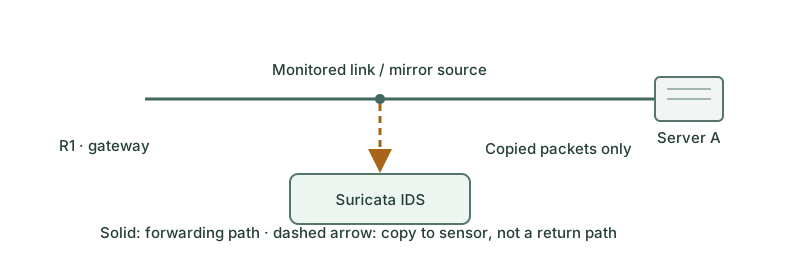
From packets to evidence
| Stage | Question it answers |
|---|---|
| Capture | Did the sensor receive the relevant packets and both directions? |
| Decode and track | Which protocol and conversation do these packets belong to? |
| Detect | Does available data match an enabled rule or an engine event? |
| Record | Which alert, flow or protocol event should be logged? |
Packets can span a TCP stream; a detection need not correspond to a single isolated frame. A parser can identify an application independently of the well-known port number. Rule selection, protocol support and inspection limits still matter: Suricata does not guarantee recognition of every application or every threat.
Read one alert
EVE is a JSON event stream. The following reduced record is constructed for this lesson, not captured traffic. The rule name describes a benign lab marker, not a verified intrusion.
{"event_type":"alert","flow_id":42,
 "src_ip":"10.10.10.20","dest_ip":"192.0.2.80",
 "proto":"TCP","app_proto":"http",
 "alert":{"action":"allowed","signature_id":1000001,
          "signature":"LAB marker observed"}}
The endpoints identify the observed conversation. The signature identifies the detection that fired. Here allowed is the alert action; it does not prove delivery to the application. Other alerts or enforcement components can affect the final outcome. A flow identifier helps correlate events from the same sensor run; it is not an IP address or a permanent global identity.
What an alert cannot prove
An alert is an investigation lead. Check the matching rule, packet context, endpoints and application records before deciding whether it is malicious. A quiet dashboard is also inconclusive: missing traffic, disabled rules, capture loss or encryption can hide the evidence you expected.
Encrypted TLS application data normally remains encrypted to this sensor. Some handshake and flow metadata may still be available, depending on protocol version and encryption. Suricata does not automatically decrypt TLS simply because it is inline.
A useful first validation
Start with a known benign conversation in an authorized lab. Confirm that it crosses the monitored link; verify capture counters, then find its protocol or flow record. Only then test a harmless local detection marker. This isolates capture, parsing, rule and logging problems instead of treating every missing alert as a rule failure.
Installation, HOME_NET, rules and offline PCAP processing are later lessons. This introduction does not change the host, mirror traffic or start enforcement.
Further reading
Key Takeaways
- Suricata supports detection, prevention and network security monitoring.
- Passive sensors inspect packet copies; the original traffic does not pass through them.
- Capture, protocol processing, detection and logging are separate checks.
- An alert is evidence to investigate, not automatic proof of compromise or prevention.
- Encryption, packet loss and placement limit what a sensor can detect.