PPPoE server deployment
Carry a point-to-point session across an Ethernet access segment.
Independent lab examples; selected output and frame summaries are illustrative. Port naming and command support vary by switch and software release.
Network and objective
Router broadband-access feature, not a universal Layer 2 switch function. Requires an image supporting PPPoE server, virtual templates, and client dialer interfaces. The local lab CHAP secret is a placeholder.
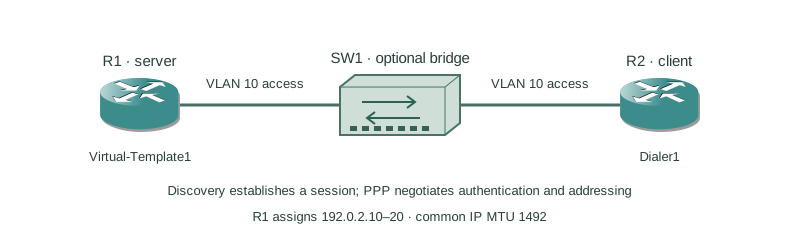
R1 is a PPPoE access concentrator and R2 is the client on one isolated Ethernet segment. SW1 may bridge that segment but does not terminate PPPoE. R1 assigns R2 an address from 192.0.2.10–20.
How it works
Discovery uses PADI, PADO, PADR, and PADS to locate the concentrator and establish a session ID. PPP negotiation then establishes link parameters, authentication, and network-layer settings. An Ethernet link can be up while discovery or PPP still fails.
The server BBA group points to a virtual template; a virtual-access instance is created for each session. The template borrows R1’s loopback address and allocates the peer address from a local pool. The client binds its physical Ethernet interface to a dialer pool.
Standard PPPoE consumes eight bytes over an Ethernet payload, commonly leaving an IP MTU of 1492 on a 1500-byte Ethernet path. Larger supported designs require end-to-end agreement. CHAP demonstrates authentication here, but it does not encrypt user traffic.
Configure or inspect
R1 — server
hostname R1
username R2 password 0 REPLACE_WITH_LAB_SECRET
ip local pool PPPOE-CLIENTS 192.0.2.10 192.0.2.20
interface Loopback0
 ip address 192.0.2.1 255.255.255.255
bba-group pppoe global
 virtual-template 1
interface Virtual-Template1
 mtu 1492
 ip unnumbered Loopback0
 peer default ip address pool PPPOE-CLIENTS
 ppp authentication chap
interface GigabitEthernet0/0
 no ip address
 pppoe enable group global
 no shutdown
R2 — client
hostname R2
interface GigabitEthernet0/0
 no ip address
 pppoe enable
 pppoe-client dial-pool-number 1
 no shutdown
interface Dialer1
 mtu 1492
 ip address negotiated
 encapsulation ppp
 dialer pool 1
 ppp chap hostname R2
 ppp chap password 0 REPLACE_WITH_LAB_SECRET
SW1 — optional intervening switch
vlan 10
interface range GigabitEthernet1/0/1 - 2
 switchport mode access
 switchport access vlan 10
 no shutdown
Verify the result
R1#show pppoe session
Session ID  State  Interface  Virtual-Access
1           UP     Gi0/0      Vi2
R2#show ip interface brief | include Dialer1
Dialer1 192.0.2.10 YES IPCP up up
R2#ping 192.0.2.1
!!!!!
Success rate is 100 percent (5/5)
R2 uses pppoe-client dial-pool-number 1 to bind the physical interface to Dialer1; pppoe enable is the client-interface enable form shown in the supported router guide. The named BBA group and virtual template belong to R1’s server role. Match R2’s CHAP identity and secret to R1. The session and negotiated address demonstrate both Ethernet discovery and PPP network negotiation.
Failure and recovery
Discovery completes but CHAP fails because the client’s configured CHAP hostname or secret does not match the server’s local username entry.
Check the session phase first, then match the intended CHAP identity and secret on both ends. Verify the BBA-to-template mapping, address pool, dialer pool, and negotiated MTU. Restore only the isolated lab client session after correcting the cause.
Further reading
Key Takeaways
- PPPoE discovery precedes PPP negotiation.
- The BBA group selects a virtual template.
- Each client obtains a virtual-access session.
- A common IP MTU is 1492.
- CHAP authenticates but does not encrypt data.