MST regions and instances
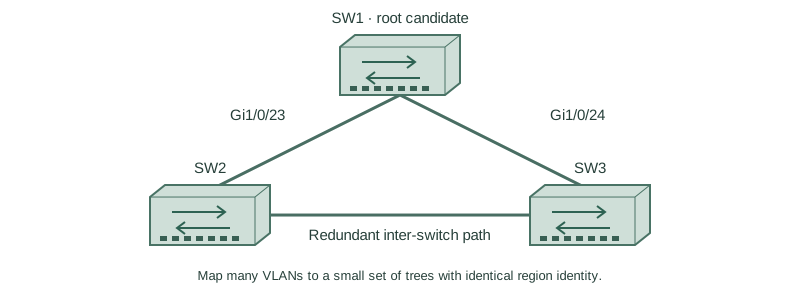
Map many VLANs to a small set of trees with identical region identity.
Independent lab examples; selected output and frame summaries are illustrative. Port naming and command support vary by switch and software release.
Network and objective
Use MST-capable switches and a consistent region. This example is independent of the earlier PVST baselines.
Use three fresh isolated switches with Gigabit trunks: SW1 Gi1/0/23 ↔ SW2 Gi1/0/23; SW1 Gi1/0/24 ↔ SW3 Gi1/0/24; SW2 Gi1/0/24 ↔ SW3 Gi1/0/23. Both VLANs10/20 exist on every switch. Baseline SW1/SW2/SW3 priorities are4096/8192/12288, with short costs and no extra links. Start independently from the included baseline for each lesson; subsequent repair snippets apply to the named device.
How it works
MST maps VLAN groups into instances so many VLANs can share one topology calculation. Region membership depends on matching configuration name, revision and VLAN-to-instance mapping digest. The revision is an identity field, not a VTP-style automatic winner that synchronizes peers.
Configure REGION-A revision1 withVLAN10→instance1 andVLAN20→instance2 identically on every switch. Give SW1 instance1 root preference and SW2 instance2 preference. Unmapped VLANs belong to instance0; CIST/boundary operation connects regions and other spanning-tree domains. Plan interoperability rather than assuming every PVST neighbor acts like another internal MST port.
Configure or inspect
SW1
vlan 10
vlan 20
spanning-tree mode mst
spanning-tree mst configuration
 name REGION-A
 revision 1
 instance 1 vlan 10
 instance 2 vlan 20
 exit
spanning-tree mst 0 priority 4096
spanning-tree mst 1 priority 4096
spanning-tree mst 2 priority 8192
interface range GigabitEthernet1/0/23 - 24
 switchport mode trunk
 switchport trunk allowed vlan 10,20
 no shutdown
SW2
vlan 10
vlan 20
spanning-tree mode mst
spanning-tree mst configuration
 name REGION-A
 revision 1
 instance 1 vlan 10
 instance 2 vlan 20
 exit
spanning-tree mst 0 priority 8192
spanning-tree mst 1 priority 8192
spanning-tree mst 2 priority 4096
interface range GigabitEthernet1/0/23 - 24
 switchport mode trunk
 switchport trunk allowed vlan 10,20
 no shutdown
SW3
vlan 10
vlan 20
spanning-tree mode mst
spanning-tree mst configuration
 name REGION-A
 revision 1
 instance 1 vlan 10
 instance 2 vlan 20
 exit
spanning-tree mst 0 priority 12288
spanning-tree mst 1 priority 12288
spanning-tree mst 2 priority 12288
interface range GigabitEthernet1/0/23 - 24
 switchport mode trunk
 switchport trunk allowed vlan 10,20
 no shutdown
Verify the result
SW3#show spanning-tree mst configuration
Name      [REGION-A]
Revision  1
Instance  Vlans mapped
0         1-9,11-19,21-4094
1         10
2         20
SW3#show spanning-tree mst
MST1  VLANs mapped: 10
MST2  VLANs mapped: 20
Compare the full mapping/digest and boundary status across all peers. Matching names alone do not prove they share a region.
Failure and recovery
A mapping mismatch makes an apparent internal link a region boundary, even with the same name and revision. Correct the approved mapping consistently; do not merely increase the revision.
Restore identical name, revision and VLAN mapping on the intended region peers, then verify digest and per-instance root/port roles.
Further reading
Key Takeaways
- MST groups VLANs into instances.
- Name, revision and mapping identify a region.
- Revision does not automatically synchronize peers.
- Unmapped VLANs use instance0.
- Boundary and mixed-mode behavior need explicit design.