Switch management addressing
Give the switch an IP endpoint without confusing management with transit routing.
Independent lab examples; selected output and frame summaries are illustrative. Port naming and command support vary by switch and software release.
Network and objective
Layer 2 switch management SVI example. On a routed switch use a routing-table default route rather than relying on ip default-gateway.
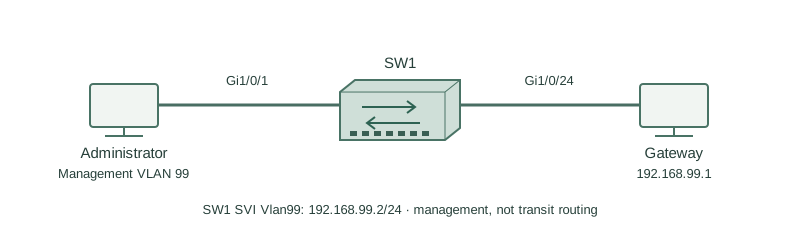
An administrator in management VLAN 99 reaches SW1 at 192.168.99.2/24. The gateway is 192.168.99.1. Gi1/0/24 carries VLAN 99 upstream; ordinary users remain in their own VLAN.
How it works
The SVI is the switch’s IP endpoint in VLAN 99. A Layer 2 switch does not need an IP address to learn MAC addresses and forward local Ethernet frames, but it does need an appropriate IP endpoint for SSH, monitoring, and other IP management services.
An SVI normally needs the VLAN to exist and a suitable active forwarding port in that VLAN before its line protocol is up. Creating interface Vlan99 and assigning an address alone does not prove that the VLAN has a working transport path.
A nonrouting switch uses ip default-gateway for management destinations outside the subnet. With ip routing enabled, forwarding follows the routing table instead. Restrict management access using appropriate SSH, AAA, ACL, and out-of-band policy; a management VLAN alone is not complete security.
Configure or inspect
vlan 99
 name MANAGEMENT
interface Vlan99
 ip address 192.168.99.2 255.255.255.0
 no shutdown
interface GigabitEthernet1/0/24
 switchport mode trunk
 switchport trunk allowed vlan add 99
 no shutdown
exit
ip default-gateway 192.168.99.1
Verify the result
SW1#show ip interface brief | include Vlan99
Vlan99 192.168.99.2 YES manual up up
SW1#ping 192.168.99.1 source Vlan99
!!!!!
Success rate is 100 percent (5/5)
Up/up and the sourced gateway ping verify the local management path. An off-subnet test is also required to validate the gateway and return route; a local ping does not prove remote SSH authorization.
Failure and recovery
VLAN 99 is missing from the upstream trunk allowed list. The SVI can be down or locally up through another port while the remote management path still fails.
Confirm VLAN 99 exists and is allowed/forwarding on both ends of its intended trunk, then check the SVI, gateway, and remote return route. Avoid replacing the whole allowed list and accidentally removing user VLANs.
Further reading
Key Takeaways
- An SVI provides the management IP endpoint.
- Layer 2 switching does not require that IP.
- VLAN transport must actually work.
- Default-gateway is for nonrouting operation.
- Secure management beyond mere reachability.