VSS deployment
Recognize the ordered conversion from standalone chassis to a virtual pair.
Independent lab examples; selected output and frame summaries are illustrative. Port naming and command support vary by switch and software release.
Network and objective
Legacy Catalyst 6500 VSS with compatible supervisors and software only. This is not a Catalyst 9300 stacking or StackWise Virtual recipe. Conversion reloads chassis and requires a planned outage.
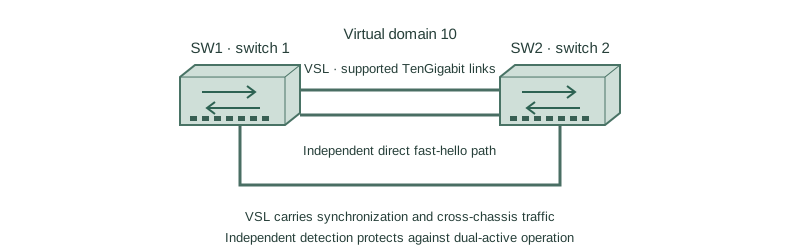
Two clean lab chassis become domain 10: SW1 is switch 1 and SW2 is switch 2. Supported TenGigabitEthernet1/5/4 and 1/5/5 ports are VSL members on each standalone chassis before conversion; physical port names must match the actual module.
How it works
Inventory and back up both standalone systems before conversion. Confirm a supported software image and matching VSS requirements, then configure a common domain with different switch numbers. Do not connect a production access network until the logical system is stable.
Each side needs a VSL port-channel tied to its local switch identity. The VSL is not an ordinary user trunk; use only documented VSL-capable interfaces and follow the platform restrictions. Conversion changes interface naming and stored configuration.
After conversion, verify active/standby hot state, VSL health, and an independent dual-active detection mechanism. VSL redundancy alone is not dual-active detection. A suitable dedicated fast-hello path is one supported option on relevant releases.
Configure or inspect
switch virtual domain 10
 switch 1
exit
interface Port-channel10
 switch virtual link 1
exit
interface range TenGigabitEthernet1/5/4 - 5
 channel-group 10 mode on
 no shutdown
end
write memory
Verify the result
SW1#show switch virtual
Virtual switch domain number: 10
Local switch number: 1
Operational role: Virtual Switch Active
Peer role: Virtual Switch Standby
SW1#show switch virtual link
VSL Status: UP
SW1#show redundancy states
my state = ACTIVE
peer state = STANDBY HOT
The configuration shows the switch-1 side only. On SW2 use switch 2, switch virtual link 2, and its own VSL port-channel. Then run switch convert mode virtual on each chassis in the planned sequence; it reloads them. The output is the expected post-conversion state, not proof that merely entering the preparation lines converts the pair.
Failure and recovery
The pair is converted without an independent dual-active path. Losing all VSL members can leave both chassis believing they should be active.
Before service, add and verify the release-supported fast-hello, enhanced PAgP, or BFD dual-active design. For fast-hello, the domain enables dual-active detection fast-hello and a dedicated compatible direct interface uses dual-active fast-hello. Exact interface restrictions and recovery behavior follow the chassis guide.
Further reading
Key Takeaways
- VSS is a platform-specific legacy deployment.
- Domain IDs match; switch IDs differ.
- VSL must use supported ports.
- Conversion reloads and changes the system.
- Verify standby hot and dual-active protection.