Small-business VLAN deployment
Apply the same VLAN principles through a model-specific web interface.
Independent lab examples; selected output and frame summaries are illustrative. Port naming and command support vary by switch and software release.
Network and objective
Legacy SG300-style GUI workflow, not a universal current product UI. Menu names and default port modes vary; verify the exact model and firmware. Do not reuse factory credentials.
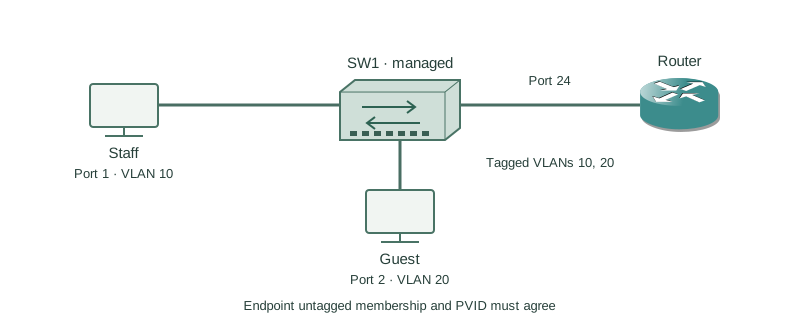
A small office switch serves staff on port 1 in VLAN 10 and guests on port 2 in VLAN 20. Port 24 connects to a router that carries tagged VLANs 10 and 20. A known management path remains available during the change.
How it works
Create VLAN IDs before assigning ports. For each endpoint select access mode, make its intended VLAN untagged, and set the matching PVID. The PVID classifies incoming untagged traffic; egress membership determines whether frames leave tagged or untagged.
The router uplink must carry the expected tagged VLANs and use a consistent untagged/native policy. These are separate from merely creating the VLAN database entries. Do not assume the default mode on a small-business product matches a Catalyst access switch.
Apply changes, test from one endpoint in each VLAN, and save the running configuration to startup using the product’s save function. Keep management connectivity intact until the new management VLAN is proven; a wrong PVID can lock out the browser before changes are saved.
Configure or inspect
No feature change is required for this conceptual comparison. Inspect the operational state below on an isolated compatible lab platform.
Verify the result
Expected membership audit (normalized GUI export)
Port  Mode    PVID  VLAN 10  VLAN 20
1     Access  10    Untagged Excluded
2     Access  20    Excluded Untagged
24    Trunk   99    Tagged   Tagged
Management/native VLAN 99 must match the router design.
The table is a planned-state audit rather than CLI output. VLAN 99 on the uplink needs its own deliberate membership and peer configuration; it is not automatically created by the PVID value shown.
Failure and recovery
The guest port is untagged in VLAN 20 but retains PVID 10, so received untagged traffic enters the wrong VLAN.
In the interface VLAN settings, align port 2’s access mode, untagged membership, and PVID to VLAN 20. Test the correct gateway and isolation, then save. Use the preserved management path or console if the GUI session is lost.
Further reading
Key Takeaways
- Create VLANs before membership changes.
- PVID classifies untagged ingress.
- Egress tagging is a separate property.
- Preserve a management recovery path.
- Apply and save are separate operations.