Protected ports
Isolate access hosts locally while preserving access to shared uplinks.
Independent lab examples; selected output and frame summaries are illustrative. Port naming and command support vary by switch and software release.
Network and objective
Switchport protected is a local switch isolation feature; it does not provide end-to-end private-VLAN isolation across unrelated switches.
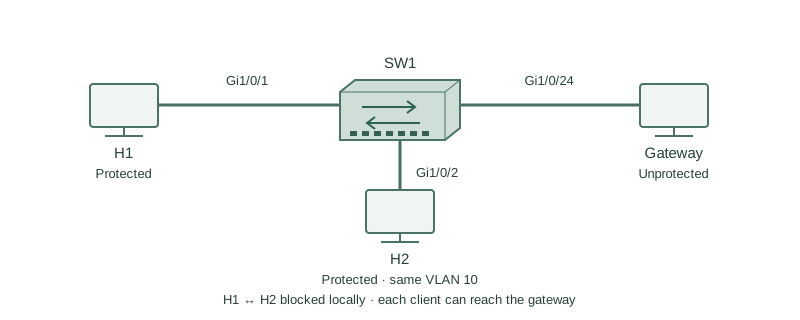
H1 and H2 use Gi1/0/1 and Gi1/0/2 in VLAN 10 on SW1. Gi1/0/24 is an unprotected uplink to their gateway and shared services.
How it works
Two protected ports on the same switch do not forward ordinary Layer 2 traffic to each other. A protected port can communicate with an unprotected port, so both clients can still reach the gateway.
The protection is not encoded as an end-to-end VLAN property on the wire. A client on another standalone switch may be reachable through an unprotected uplink even if its local access port is also protected. Use a supported private-VLAN or policy design for wider isolation.
Layer 3 traffic routed through an unprotected gateway may also allow communication that local Layer 2 isolation would block. Define whether the requirement is same-switch frame isolation or application-level tenant separation before selecting this feature.
Configure or inspect
vlan 10
interface range GigabitEthernet1/0/1 - 2
 switchport mode access
 switchport access vlan 10
 switchport protected
interface GigabitEthernet1/0/24
 switchport mode access
 switchport access vlan 10
 no switchport protected
Verify the result
SW1#show interfaces Gi1/0/1 switchport
Administrative Mode: static access
Access Mode VLAN: 10
Protected: true
Test results
H1 -> H2 directly: blocked
H1 -> gateway on Gi1/0/24: reachable
Both clients remain in the same IP subnet and VLAN; protected status changes local forwarding eligibility. The test results assume no routing workaround and no separate host firewall failure.
Failure and recovery
An engineer marks the shared gateway uplink protected as well. Client access to that uplink is now blocked.
interface GigabitEthernet1/0/24
 no switchport protected
Further reading
Key Takeaways
- Protected-to-protected forwarding is blocked locally.
- Protected-to-unprotected forwarding is permitted.
- The VLAN and subnet need not change.
- Isolation does not automatically span switches.
- Routed policy may still be required.