MAC Authentication Bypass
Provide a controlled fallback for endpoints without an 802.1X supplicant.
Independent lab examples; selected output and frame summaries are illustrative. Port naming and command support vary by switch and software release.
Network and objective
Classic authentication-manager MAB example, extending the previous working RADIUS setup. Exact identity formatting and authorization attributes follow the NAC server policy.
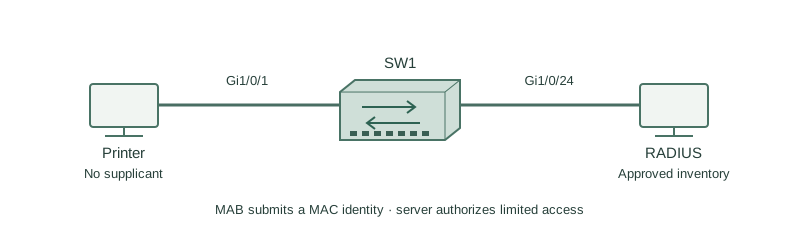
A lab printer on SW1 Gi1/0/1 cannot speak EAPOL. Its registered MAC is 0200.0000.0050, and RADIUS policy assigns a restricted printer role rather than broad user access.
How it works
MAB uses a learned source MAC as an identifier sent to the authentication server. It is useful for devices that cannot run a supplicant, but a MAC address is readily imitated and does not prove possession of a secret or certificate.
The switch first attempts dot1x and then MAB according to the configured order and timers. Priority controls the preferred successful method. A silent endpoint may need to send an initial frame before the switch has a MAC to identify.
The server must recognize the expected MAC format and return an appropriate limited policy. Do not build an allow-all MAB fallback for every failed identity; that would undermine the stronger 802.1X policy.
Configure or inspect
interface GigabitEthernet1/0/1
 switchport mode access
 switchport access vlan 10
 authentication order dot1x mab
 authentication priority dot1x mab
 authentication port-control auto
 mab
 dot1x pae authenticator
Verify the result
SW1#show authentication sessions interface Gi1/0/1 details
MAC Address: 0200.0000.0050
Status: Authorized
Method status list:
 dot1x  Stopped
 mab    Authc Success
Server Policies:
 VLAN: 10
The method list is the key distinction: this endpoint used MAB, not a successful 802.1X exchange. The VLAN shown is illustrative; restrict the printer’s allowed applications using the supported authorization policy.
Failure and recovery
An unknown laptop fails 802.1X but is still admitted because the RADIUS MAB rule accepts every MAC.
Restrict MAB to an approved inventory and limited role, reject unknown MAC identities, and test both a permitted printer and an unregistered endpoint. Retain 802.1X as the preferred method for capable endpoints.
Further reading
Key Takeaways
- MAB identifies a MAC rather than a certificate.
- Use it for selected non-supplicant devices.
- RADIUS policy still decides access.
- Order and priority are distinct.
- A broad fallback weakens access security.