Inter-VLAN troubleshooting
Follow the source gateway, routed decision and return path before changing the network.
Independent lab examples; selected output and frame summaries are illustrative. Port naming and command support vary by switch and software release.
Network and objective
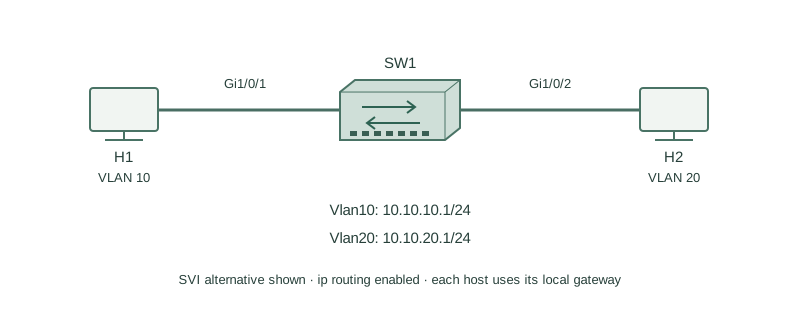
Use the independent SVI lab with H1/VLAN10 and H2/VLAN20; hosts and policies are part of the test.
H1 is10.10.10.11/24 with gateway10.10.10.1. H2 is10.10.20.12/24; its intended gateway is10.10.20.1. SW1 owns the two SVIs.
How it works
First test each host’s own gateway. If that fails, inspect local membership, addressing and SVI/member state before routing. If local gateway reachability succeeds, inspect connected routes, routing enablement, ACLs and the destination host’s return path.
A switch-originated ping can use a different source than the host and can bypass a failed host gateway. Test a selected source and the actual endpoint flow. A missing reply is not enough to identify the outbound fault without checking the return direction.
Configure or inspect
show ip interface brief
show ip route connected
show ip interface Vlan10
show ip interface Vlan20
Verify the result
SW1#show ip route connected
C 10.10.10.0/24 is directly connected, Vlan10
C 10.10.20.0/24 is directly connected, Vlan20
H2$ ip route
10.10.20.0/24 dev eth0 scope link
default via 10.10.20.254 dev eth0
Both local routes exist, but H2’s displayed default gateway is wrong for this lab. H1→H2 requests can arrive while H2’s reply chooses an unreachable gateway.
Failure and recovery
Correct the endpoint’s gateway using its network manager. A temporary Linux route replacement demonstrates the isolated fix, but persistence depends on host configuration tooling.
ip route replace default via 10.10.20.1 dev eth0
ping -c 3 10.10.10.11
Further reading
Key Takeaways
- Test each host’s local gateway first.
- Check both SVI and VLAN member state.
- Connected routes do not prove the return path.
- A switch-source test differs from endpoint traffic.
- Host gateways and filters are part of routing diagnosis.