Inter-VLAN routing
Compare router subinterfaces, switch virtual interfaces and routed ports using the same two subnets.
Independent lab examples; selected output and frame summaries are illustrative. Port naming and command support vary by switch and software release.
Network and objective
Layer 3 switching and each interface type depend on platform/license support. The three configurations below are alternatives, not cumulative instructions.
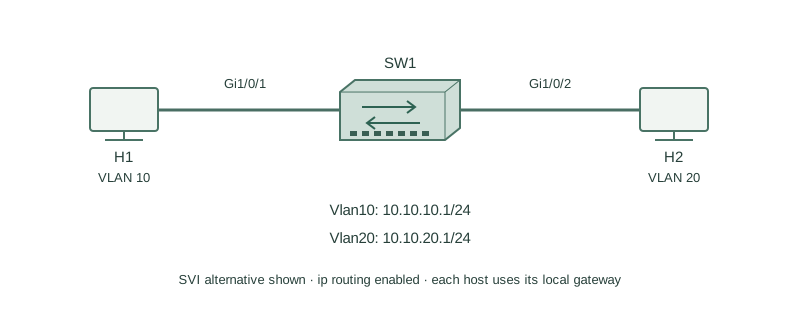
H1 uses 10.10.10.11/24 with gateway10.10.10.1; H2 uses10.10.20.12/24 with gateway10.10.20.1. VLAN10 and20 are distinct local domains.
How it works
Router-on-a-stick carries tagged VLANs to separate router subinterfaces. Each subinterface supplies a gateway. An SVI supplies a gateway within the switch’s VLAN, with ip routing enabled on a capable multilayer switch. A no-switchport routed port is a Layer 3 interface, not a VLAN trunk.
For the SVI alternative, create the two VLANs and place H1/H2 on access ports1/2. An SVI’s line protocol commonly depends on an active forwarding member in the VLAN. Correct gateway, masks and return routing on the hosts remain necessary after the switch installs both connected routes.
Configure or inspect
ip routing
vlan 10
vlan 20
interface GigabitEthernet1/0/1
 switchport mode access
 switchport access vlan 10
 no shutdown
interface GigabitEthernet1/0/2
 switchport mode access
 switchport access vlan 20
 no shutdown
interface Vlan10
 ip address 10.10.10.1 255.255.255.0
 no shutdown
interface Vlan20
 ip address 10.10.20.1 255.255.255.0
 no shutdown
Verify the result
SW1#show ip route connected
C  10.10.10.0/24 is directly connected, Vlan10
C  10.10.20.0/24 is directly connected, Vlan20
SW1#show ip interface brief
Vlan10   10.10.10.1   YES manual up up
Vlan20   10.10.20.1   YES manual up up
These connected routes support the local routed decision. For a separate router alternative use interface Gi0/0.10 with encapsulation dot1Q10 and .20 with dot1Q20, placing the same gateway IPs there instead; for a point-to-point routed-port alternative assign IPs under no switchport interfaces. Do not duplicate those gateway addresses across alternatives.
Failure and recovery
If H1 reaches its gateway but not H2, verify H2’s gateway, VLAN20 SVI/member state, route and filtering. An SVI configured no shutdown can still be protocol-down when its VLAN has no eligible active port.
Restore VLAN20 and its intended active member, then verify both connected routes and bidirectional host traffic before blaming the routing protocol.
Further reading
Key Takeaways
- Different VLANs require a routed path for IP traffic.
- ROAS, SVIs and routed ports are different alternatives.
- A capable switch needs routing enabled.
- SVI line state depends on VLAN/member conditions.
- Host gateways and return paths must match.