Flood-and-Learn Multicast Deployment
Bind an untagged Ethernet service instance to a bridge domain and multicast VXLAN on a separate legacy router platform.
Keep this platform example independent
This is the legacy router/service-instance model, not NX-OS VLAN syntax and not a claim of support on every IOS XE router. CORE provides OSPF transport and the bidirectional PIM RP at 10.255.0.3. VTEP1/2 bridge H1/H2 through VNI 5012. Hosts use 10.10.10.11/24 and .22/24 on untagged access links.
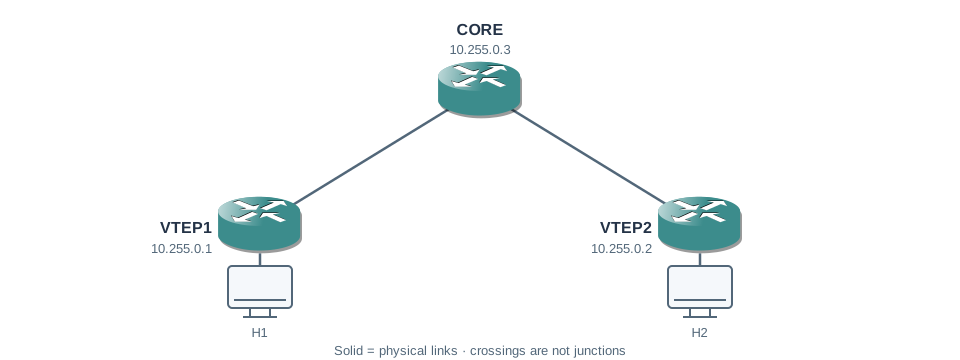
| Physical link | Address at first endpoint | Address at second endpoint |
|---|---|---|
| CORE GigabitEthernet2 ↔ VTEP1 GigabitEthernet3 | 192.0.2.1/30 | 192.0.2.2/30 |
| CORE GigabitEthernet3 ↔ VTEP2 GigabitEthernet3 | 192.0.2.5/30 | 192.0.2.6/30 |
| Device | Loopback0 / router ID |
|---|---|
| VTEP1 | 10.255.0.1/32 |
| VTEP2 | 10.255.0.2/32 |
| CORE | 10.255.0.3/32 |
Build routing and bidirectional multicast
All three devices · multicast additions
ip multicast-routing distributed
ip pim bidir-enable
ip pim rp-address 10.255.0.3 bidir
Enable PIM sparse mode on each listed transport interface and Loopback0, and advertise those networks with OSPF as shown in the complete recipe. Bidirectional PIM uses a shared tree and designated-forwarder behavior; it is not the PIM-SM register/SPT process taught in the NX-OS multicast example. Verify image support for bidirectional PIM and NVE before choosing this historical lab.
Bind access service to VNI
VTEP1 and VTEP2 · identical bridge binding
interface GigabitEthernet2
 no ip address
 no shutdown
 service instance 1 ethernet
  encapsulation untagged
interface nve1
 no shutdown
 source-interface Loopback0
 member vni 5012 mcast-group 239.1.1.1
bridge-domain 1
 member vni 5012
 member GigabitEthernet2 service-instance 1
The service instance classifies the untagged host frames. Bridge-domain 1 joins that local attachment to VNI 5012. The bridge-domain number and VNI need not be equal, and this is not an SVI with the host’s gateway address.
Check transport and the bridge separately
VTEP1# show ip pim rp mapping
Group(s): 224.0.0.0/4
RP: 10.255.0.3, static, BidirVTEP1# show nve vni
Interface VNI Multicast-group State
nve1 5012 239.1.1.1 UpVTEP1# show bridge-domain 1
Bridge-domain 1
Member: GigabitEthernet2 service-instance 1
Member: vni 5012These selected fields represent the intended state. Confirm the actual bridge member, VNI and multicast group before generating a fresh host exchange. An NVE Up state cannot prove that the access service is in the bridge.
Compare unknown and known delivery
Outer source: 10.255.0.1
Outer destination: 239.1.1.1
UDP destination: 4789; VNI 5012
Inner destination: broadcast or unknown unicast
The opposite VTEP learns a remote source location from received traffic. Later known unicast is directed toward the learned VTEP address. In an authorized lab, compare host-side Ethernet with transport-side VXLAN captures; do not mistake the outer multicast MAC for the tenant destination MAC.
A bridge member fault
If NVE and multicast look correct but no host source is learned, check whether the host sends tagged or untagged frames and whether service instance 1 is the bridge member. Restore the shown member binding and untagged classification; do not paste NX-OS switchport/vn-segment commands into this router model. Retest in both directions and leave the transport interfaces routed.
Complete independent lab configurations
Start with clean isolated lab devices. These are the complete scenario configurations, not changes to apply on top of a different lesson. Physical ports must match the address table. Virtual-image data-plane capabilities can differ from physical switches; these examples have not been executed on live devices.
Download configuration reference
VTEP1
hostname VTEP1
ip multicast-routing distributed
ip pim bidir-enable
ip pim rp-address 10.255.0.3 bidir
interface Loopback0
 ip address 10.255.0.1 255.255.255.255
 ip pim sparse-mode
interface GigabitEthernet3
 mtu 1600
 ip address 192.0.2.2 255.255.255.252
 ip pim sparse-mode
 no shutdown
router ospf 1
 router-id 10.255.0.1
 network 10.255.0.1 0.0.0.0 area 0
 network 192.0.2.0 0.0.0.3 area 0
interface GigabitEthernet2
 no ip address
 no shutdown
 service instance 1 ethernet
  encapsulation untagged
interface nve1
 no shutdown
 source-interface Loopback0
 member vni 5012 mcast-group 239.1.1.1
bridge-domain 1
 member vni 5012
 member GigabitEthernet2 service-instance 1
VTEP2
hostname VTEP2
ip multicast-routing distributed
ip pim bidir-enable
ip pim rp-address 10.255.0.3 bidir
interface Loopback0
 ip address 10.255.0.2 255.255.255.255
 ip pim sparse-mode
interface GigabitEthernet3
 mtu 1600
 ip address 192.0.2.6 255.255.255.252
 ip pim sparse-mode
 no shutdown
router ospf 1
 router-id 10.255.0.2
 network 10.255.0.2 0.0.0.0 area 0
 network 192.0.2.4 0.0.0.3 area 0
interface GigabitEthernet2
 no ip address
 no shutdown
 service instance 1 ethernet
  encapsulation untagged
interface nve1
 no shutdown
 source-interface Loopback0
 member vni 5012 mcast-group 239.1.1.1
bridge-domain 1
 member vni 5012
 member GigabitEthernet2 service-instance 1
CORE
hostname CORE
ip multicast-routing distributed
ip pim bidir-enable
ip pim rp-address 10.255.0.3 bidir
interface Loopback0
 ip address 10.255.0.3 255.255.255.255
 ip pim sparse-mode
interface GigabitEthernet2
 mtu 1600
 ip address 192.0.2.1 255.255.255.252
 ip pim sparse-mode
 no shutdown
interface GigabitEthernet3
 mtu 1600
 ip address 192.0.2.5 255.255.255.252
 ip pim sparse-mode
 no shutdown
router ospf 1
 router-id 10.255.0.3
 network 10.255.0.3 0.0.0.0 area 0
 network 192.0.2.0 0.0.0.3 area 0
network 192.0.2.4 0.0.0.3 area 0| Host | Address | Gateway |
|---|---|---|
| H1 | 10.10.10.11/24 | none |
| H2 | 10.10.10.22/24 | none |
Further reading
Key Takeaways
- This legacy IOS XE example uses service instances and a bridge domain.
- The access attachment and VNI must both be members of the intended bridge.
- Bidirectional PIM uses a shared-tree model distinct from PIM-SM source registration.
- NVE state, multicast state and bridge membership are independent checks.
- Platform-specific syntax must not be mixed across IOS XE and NX-OS.