EtherChannel fundamentals
Bundle parallel links while keeping one logical Layer 2 interface.
Independent lab examples; selected output and frame summaries are illustrative. Port naming and command support vary by switch and software release.
Network and objective
IOS-style LACP example on switches supporting Layer 2 EtherChannel; member limits and hashing options vary by hardware.
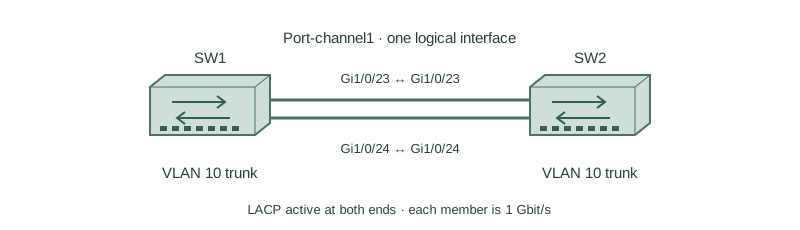
SW1 and SW2 connect through Gi1/0/23 and Gi1/0/24. Hosts in VLAN 10 use the bundle. Configure both switches identically below, starting with unbundled lab ports.
How it works
Two independent parallel links create a loop, so spanning tree must block one path. A correctly formed port-channel presents one logical link to spanning tree. It still participates in spanning tree; aggregation does not disable loop prevention.
LACP active sends negotiation messages; passive answers them. Active/active and active/passive can form a channel, but passive/passive cannot initiate it. PAgP uses desirable/auto, while static on skips negotiation and needs careful matching at both ends.
A hash selects a member for a flow using supported MAC, IP, or transport fields. Two 1-Gbit/s links can carry multiple flows concurrently, but a single ordinary flow remains limited by one member. A failed member causes affected flows to be reassigned.
Configure or inspect
vlan 10
interface range GigabitEthernet1/0/23 - 24
 switchport mode trunk
 switchport trunk allowed vlan 10
 channel-group 1 mode active
 no shutdown
interface Port-channel1
 switchport mode trunk
 switchport trunk allowed vlan 10
Verify the result
SW1#show etherchannel summary
Group  Port-channel  Protocol  Ports
1      Po1(SU)       LACP      Gi1/0/23(P) Gi1/0/24(P)
SW1#show spanning-tree vlan 10 interface port-channel 1
Port  Role  Sts  Cost
Po1   Desg  FWD  3
S means Layer 2, U means in use, and P identifies bundled members. The cost is illustrative for a short-cost platform and depends on active bandwidth and cost mode. Inspect the logical interface, not just the two physical link lights.
Failure and recovery
Both ends are changed to LACP passive. Physical interfaces remain up, but the negotiated bundle does not form.
On SW1, enter interface range GigabitEthernet1/0/23 - 24, remove the old channel-group assignment if required by the platform, and restore channel-group 1 mode active. Recheck P on both members.
Further reading
Key Takeaways
- A port-channel is one STP link.
- LACP needs an active initiator.
- Member configuration must be compatible.
- Aggregate capacity is shared across flows.
- Check logical and member state together.