Spanning-tree troubleshooting
Compare observed roles with a calculated expectation before changing protection.
Independent lab examples; selected output and frame summaries are illustrative. Port naming and command support vary by switch and software release.
Network and objective
Classic PVST+ is used to expose original STP behavior; rapid-PVST+ and MST are separate lessons.
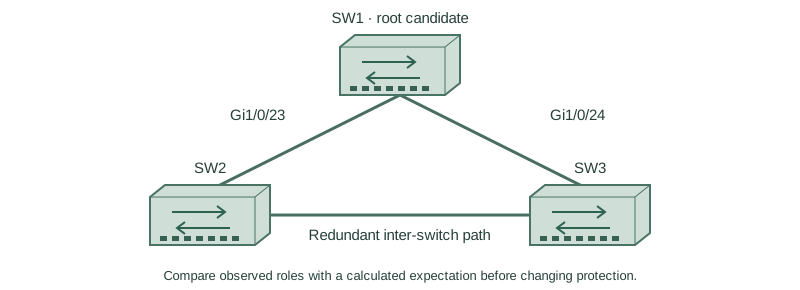
Use three fresh isolated switches with Gigabit trunks: SW1 Gi1/0/23 ↔ SW2 Gi1/0/23; SW1 Gi1/0/24 ↔ SW3 Gi1/0/24; SW2 Gi1/0/24 ↔ SW3 Gi1/0/23. Both VLANs10/20 exist on every switch. Baseline SW1/SW2/SW3 priorities are4096/8192/12288, with short costs and no extra links. Start independently from the included baseline for each lesson; subsequent repair snippets apply to the named device.
How it works
Draw the actual links, VLAN participation, bridge IDs and costs. A slower physical link can be selected if an explicit cost override makes it preferable; the correct diagnosis is not necessarily an STP algorithm failure. Compare the full root-path preference before port IDs.
Other independent causes include STP disabled for a VLAN, BPDUs filtered on a transit link and a VLAN absent from a trunk. Each changes the information available to the protocol. Inconsistency protection can intentionally block a port; preserve its safety purpose while repairing the underlying mismatch.
Configure or inspect
SW1
vlan 10
vlan 20
spanning-tree mode pvst
spanning-tree pathcost method short
spanning-tree vlan 10 priority 4096
spanning-tree vlan 20 priority 4096
interface range GigabitEthernet1/0/23 - 24
 switchport mode trunk
 switchport trunk allowed vlan 10,20
 switchport nonegotiate
 no shutdown
exit
SW2
vlan 10
vlan 20
spanning-tree mode pvst
spanning-tree pathcost method short
spanning-tree vlan 10 priority 8192
spanning-tree vlan 20 priority 8192
interface range GigabitEthernet1/0/23 - 24
 switchport mode trunk
 switchport trunk allowed vlan 10,20
 switchport nonegotiate
 no shutdown
exit
SW3
vlan 10
vlan 20
spanning-tree mode pvst
spanning-tree pathcost method short
spanning-tree vlan 10 priority 12288
spanning-tree vlan 20 priority 12288
interface range GigabitEthernet1/0/23 - 24
 switchport mode trunk
 switchport trunk allowed vlan 10,20
 switchport nonegotiate
 no shutdown
exit
interface GigabitEthernet1/0/24
 spanning-tree vlan 10 cost 20
Verify the result
SW3#show spanning-tree vlan 10
Gi1/0/23  Root FWD 4
Gi1/0/24  Altn BLK 20
SW3#show running-config interface GigabitEthernet1/0/24
interface GigabitEthernet1/0/24
 spanning-tree vlan 10 cost 20
The explicit direct cost20 explains why SW3 chooses the two-hop cost8 path through SW2. Restoring automatic cost should restore the intended direct cost4 root port.
Failure and recovery
Reset each scenario to the supplied baseline before introducing the next fault. Never clear an inconsistent state by disabling loop control while leaving redundant physical paths active.
SW3
interface GigabitEthernet1/0/24
 no spanning-tree vlan 10 cost
end
show spanning-tree vlan 10
Further reading
Key Takeaways
- Calculate expected roles from actual costs and IDs.
- An override can explain a surprising path.
- Check VLAN carriage and BPDU processing.
- Inconsistency can be deliberate protection.
- Repair one independent cause and reverify.