AF_PACKET bridge deployment
Inspect between two dedicated interfaces without confusing userspace forwarding with a normal Linux bridge.
Examples target Suricata 8.0.1 on a prepared Linux lab host. Constructed outputs are illustrative, not live sensor results. Commands are lesson examples; no sensor or enforcement is started by this page.
Place the sensor in the lab path
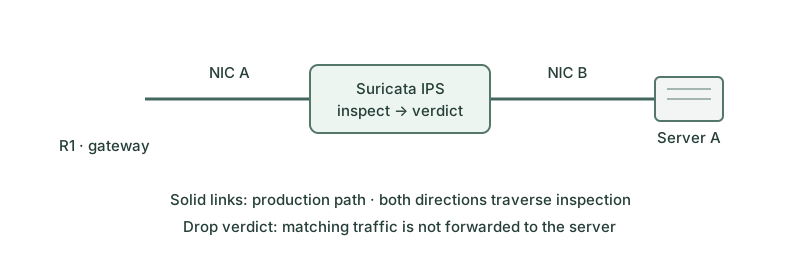
This isolated Layer-2 example connects a lab gateway-facing data0 to a server-facing data1. Management uses a third interface. There is no parallel cable or kernel bridge bypassing inspection. The client and server addressing and routing must work across the transparent pair; Suricata is not supplying an IP gateway for either endpoint.
Prepare the paired interfaces
ip link set data0 mtu 1500 up
ip link set data1 mtu 1500 up
ethtool -K data0 gro off lro off tso off
ethtool -K data1 gro off lro off tso off
These are configuration examples for dedicated lab NICs, not actions performed here. Confirm driver support and inspect ethtool -k afterward. The pair needs matching MTUs; aggregation/segmentation settings that create oversized transmit units must be reviewed. Do not enslave these interfaces to a forwarding Linux bridge for this userspace pair example.
Configure symmetric packet copying
af-packet:
  - interface: data0
    threads: 1
    cluster-id: 98
    cluster-type: cluster_flow
    defrag: no
    tpacket-v3: no
    copy-mode: ips
    copy-iface: data1
  - interface: data1
    threads: 1
    cluster-id: 97
    cluster-type: cluster_flow
    defrag: no
    tpacket-v3: no
    copy-mode: ips
    copy-iface: data0
stream:
  inline: auto
Merge this excerpt into the matching complete YAML, replacing its af-packet entries and setting the existing stream.inline value. Keep the established HOME_NET, rule selection and EVE settings. Different cluster IDs separate the two capture entries. One thread per interface keeps this teaching example simple; scaling requires documented flow-consistent distribution, especially with fragments.
Validate before inserting the path
suricata -T -c /etc/suricata/suricata.yaml --init-errors-fatal
suricata -c /etc/suricata/suricata.yaml --af-packet
Plan the insertion during an isolated lab window with out-of-band access and a known rollback. Avoid another service instance on the same interfaces. Begin with the alert marker and a benign control, then use only the narrow approved drop marker for prevention testing.
jq -c 'select(.event_type=="alert") | {sid:.alert.signature_id,action:.alert.action}' /var/log/suricata/eve.json
{"sid":1000002,"action":"blocked"}
This constructed record is one part of the test: correlate it with the destination not receiving the marker and the ordinary request still succeeding.
Test failure and restoration
If the process stops, the userspace pair is no longer copying packets; hardware bypass or a separately designed redundant path would be needed for continued forwarding. That is an availability design, not a property guaranteed by copy-mode. Restore the original lab path deliberately after testing and return the saved NIC/configuration settings. Removing one cable without restoring a path is not rollback.
AF_PACKET tap mode is a different userspace forwarding choice: it does not honor drop actions as IPS prevention. It should not be presented as equivalent to a physical TAP.
Further reading
Key Takeaways
- The AF_PACKET pair copies packets between two dedicated data NICs.
- Matching MTUs and appropriate offloads are prerequisites.
- The two entries need symmetric copy-iface settings and distinct cluster IDs.
- An inline verdict needs endpoint evidence as well as an alert.
- Process failure does not automatically provide a hardware bypass path.