802.1X authentication
Authorize an access session through a supplicant, authenticator, and RADIUS server.
Independent lab examples; selected output and frame summaries are illustrative. Port naming and command support vary by switch and software release.
Network and objective
Classic IOS authentication-manager syntax for a supported switch. IBNS policy syntax differs on newer deployments. RADIUS service, client registration, certificates, and endpoint supplicant are external prerequisites.
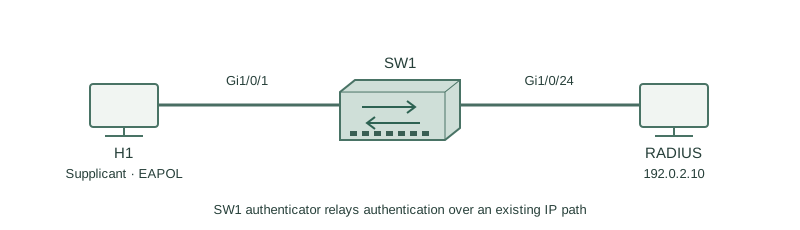
H1 connects to SW1 Gi1/0/1. SW1 reaches RADIUS at 192.0.2.10 through an already working management path. The RADIUS policy accepts the lab identity and authorizes VLAN 10.
How it works
H1 is the supplicant; SW1 is the authenticator; RADIUS evaluates credentials and policy. EAPOL is exchanged on the access link, while SW1 transports the EAP exchange to the server over RADIUS.
Auto port control requires authorization instead of granting ordinary user access immediately. Authentication proves an identity according to the EAP method, and authorization decides what access the identity receives. A link-up indication alone says nothing about that decision.
Use an appropriate EAP method such as EAP-TLS with correct certificate validation. The example shared secret is a replace-before-use placeholder, not a production credential. Define server-unavailable behavior deliberately; permissive fallback is not implied by 802.1X.
Configure or inspect
aaa new-model
radius server LAB-RADIUS
 address ipv4 192.0.2.10 auth-port 1812 acct-port 1813
 key REPLACE_WITH_LAB_SECRET
exit
aaa authentication dot1x default group radius
aaa authorization network default group radius
dot1x system-auth-control
vlan 10
interface GigabitEthernet1/0/1
 switchport mode access
 switchport access vlan 10
 authentication port-control auto
 dot1x pae authenticator
Verify the result
SW1#show authentication sessions interface Gi1/0/1 details
Interface: GigabitEthernet1/0/1
MAC Address: 0200.0000.0010
Status: Authorized
Method status list:
 dot1x  Authc Success
Server Policies:
 VLAN: 10
Authorized and dot1x success show a completed session under the server’s policy. Validate RADIUS reachability and server logs if the session remains unauthorized; do not bypass access control just because link state is up.
Failure and recovery
The RADIUS server has the wrong shared secret for SW1. EAPOL begins, but the RADIUS exchange does not complete successfully.
Correct the matching secret on the registered RADIUS client and switch, verify time and certificates for the selected EAP method, then reauthenticate the single lab session and confirm the returned VLAN.
Further reading
Key Takeaways
- Three roles participate in 802.1X.
- EAPOL and RADIUS serve different links.
- Authentication and authorization differ.
- Link up is not session authorization.
- Server and endpoint configuration are required.