DHCP snooping
Accept server replies only from trusted paths and record client bindings.
Independent lab examples; selected output and frame summaries are illustrative. Port naming and command support vary by switch and software release.
Network and objective
IPv4 DHCP snooping on supported Layer 2 access switches. Trust and option-82 policy must match the DHCP relay/server design.
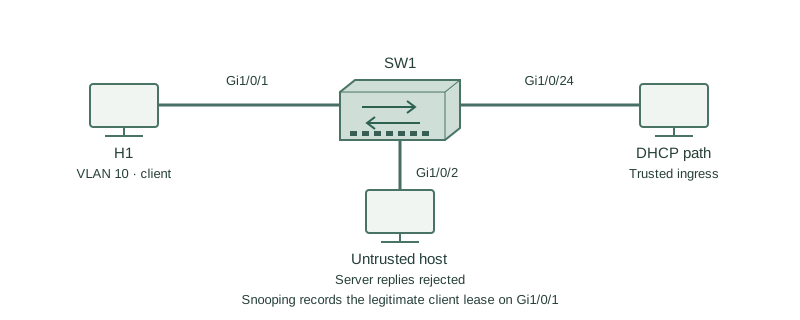
H1 is on SW1 Gi1/0/1 in VLAN 10. The authorized DHCP server or relay is reached through Gi1/0/24. An unauthorized server connected to another access port must not supply leases.
How it works
Snooping distinguishes client requests from server messages. Untrusted access ports can send permitted client requests, but server replies arriving there are rejected. Trust only the controlled path from the legitimate server, not every uplink simply because it is fast.
A completed lease exchange creates a binding containing MAC, leased IP, VLAN, interface, and remaining lease. This table supports DAI and IP Source Guard; it is not the switch MAC forwarding table and does not list every static-addressed host.
Some networks use option 82 inserted by the switch and others need different relay trust rules. Confirm server compatibility rather than disabling checks without diagnosis. Plan binding persistence and restart behavior before dependent features are enabled.
Configure or inspect
ip dhcp snooping
ip dhcp snooping vlan 10
vlan 10
interface GigabitEthernet1/0/1
 switchport mode access
 switchport access vlan 10
 ip dhcp snooping limit rate 15
interface GigabitEthernet1/0/24
 switchport mode trunk
 switchport trunk allowed vlan 10
 ip dhcp snooping trust
Verify the result
SW1#show ip dhcp snooping binding
MacAddress          IpAddress       Lease(sec) Type           VLAN Interface
02:00:00:00:00:10   192.168.10.10    3500       dhcp-snooping  10   Gi1/0/1
SW1#show ip dhcp snooping
DHCP snooping is enabled
Configured VLANs: 10
Gi1/0/24 trusted
Gi1/0/1 untrusted
The binding is learned after the legitimate lease exchange, not merely from the first DHCP Discover. The trusted interface is the ingress path for server replies. The client interface remains untrusted.
Failure and recovery
The server uplink is left untrusted. Discover messages leave the client, but returning Offers or ACKs are dropped and no usable binding appears.
Verify the actual authorized server path, mark only that ingress interface trusted, and renew the lab client lease. If still failing, check VLAN transport, relay reachability, option-82 handling, and rate-limit counters.
Further reading
Key Takeaways
- Trust follows legitimate server replies.
- Client-facing ports remain untrusted.
- Bindings describe leased IPv4 endpoints.
- Static hosts need separate planning.
- Dependent security needs binding continuity.