Layer 3 EtherChannel
Route over an aggregated interface instead of carrying VLANs across it.
Independent lab examples; selected output and frame summaries are illustrative. Port naming and command support vary by switch and software release.
Network and objective
Requires multilayer switches with routed-port and routed-EtherChannel support.
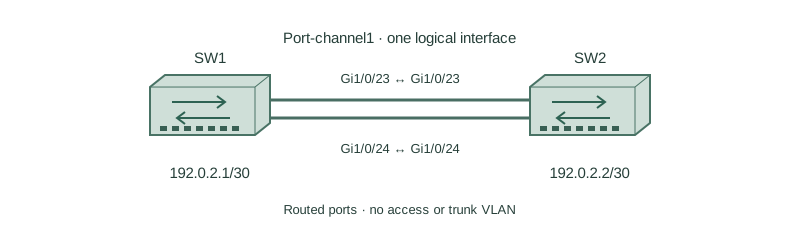
SW1 and SW2 use the same two uplinks but this is a fresh routed lab, not an additional configuration on the previous Layer 2 bundle. SW1 uses 192.0.2.1/30 and SW2 uses 192.0.2.2/30 on Po1.
How it works
A routed port-channel has an IP address and belongs to no access or trunk VLAN. Convert its physical members to routed ports before joining them; do not place the same subnet address on each member.
The routing table points to Port-channel1 as the outgoing interface. LACP still negotiates physical membership, so routed operation does not remove speed, duplex, and partner consistency requirements.
The example provides directly connected reachability only. Routing to remote subnets requires static routes or a routing protocol. Validate the peer address before adding those extra dependencies.
Configure or inspect
SW1
ip routing
interface range GigabitEthernet1/0/23 - 24
 no switchport
 channel-group 1 mode active
 no shutdown
interface Port-channel1
 no switchport
 ip address 192.0.2.1 255.255.255.252
 no shutdown
SW2
ip routing
interface range GigabitEthernet1/0/23 - 24
 no switchport
 channel-group 1 mode active
 no shutdown
interface Port-channel1
 no switchport
 ip address 192.0.2.2 255.255.255.252
 no shutdown
Verify the result
SW1#show etherchannel summary
Group  Port-channel  Protocol  Ports
1      Po1(RU)       LACP      Gi1/0/23(P) Gi1/0/24(P)
SW1#show ip route connected
C 192.0.2.0/30 is directly connected, Port-channel1
SW1#ping 192.0.2.2
!!!!!
Success rate is 100 percent (5/5)
R replaces S because the channel is routed. Configure SW2 with the same member settings and 192.0.2.2/30 on Po1. Successful peer ping verifies the connected path, not every remote route.
Failure and recovery
A member remains a switchport and cannot join the routed group, leaving reduced bandwidth or a suspended port.
Shut the affected lab member, remove its channel-group assignment, apply no switchport, then rejoin channel-group 1 mode active and no shutdown. Recheck RU and both P flags.
Further reading
Key Takeaways
- Put the IP address on the logical interface.
- Convert members to routed ports.
- RU identifies an active routed bundle.
- No trunk VLAN list belongs on a routed channel.
- Remote reachability still needs routing.