SPAN and RSPAN
Copy selected traffic to an analyzer while keeping the monitoring path separate.
Independent lab examples; selected output and frame summaries are illustrative. Port naming and command support vary by switch and software release.
Network and objective
IOS-style local SPAN and RSPAN. Session counts, source/destination combinations, encapsulation, and oversubscription behavior depend on hardware.
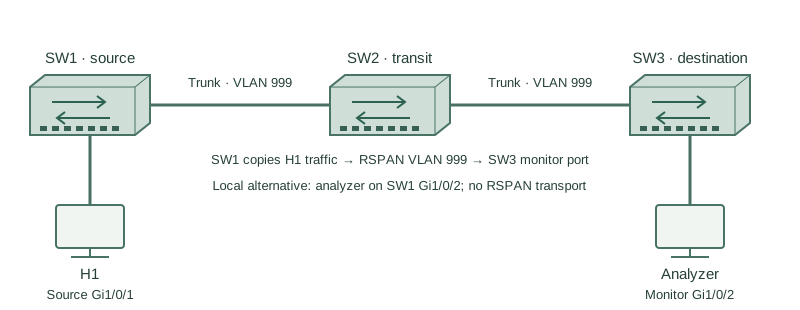
First monitor H1 on SW1 Gi1/0/1 using an analyzer on Gi1/0/2. Then, as a separate variant, transport copies in dedicated RSPAN VLAN 999 across SW1–SW2–SW3 to an analyzer on SW3 Gi1/0/2.
How it works
SPAN sources can select ingress, egress, or both directions. A monitor destination is normally dedicated to copied traffic and does not behave as an ordinary user port. Seeing a copy does not place the analyzer inline or give it IPS blocking capability.
RSPAN carries copied frames in a dedicated remote-span VLAN allowed across the intervening trunks. The source switch injects copies; the destination switch extracts them to the monitor port. Do not mix ordinary endpoint traffic into that VLAN.
Mirroring can oversubscribe the destination, producing capture drops even when production traffic forwards successfully. Duplicates, missing wire errors, and tag presentation can depend on the capture point and platform. A SPAN trace is evidence from that observation point, not a perfect wire tap.
Configure or inspect
SW1 — local SPAN
monitor session 1 source interface GigabitEthernet1/0/1 both
monitor session 1 destination interface GigabitEthernet1/0/2
SW1 — separate RSPAN variant
no monitor session 1
vlan 999
 remote-span
exit
interface GigabitEthernet1/0/24
 switchport mode trunk
 switchport trunk allowed vlan add 999
exit
monitor session 1 source interface GigabitEthernet1/0/1 both
monitor session 1 destination remote vlan 999
SW2 — RSPAN transit
vlan 999
 remote-span
exit
interface range GigabitEthernet1/0/23 - 24
 switchport mode trunk
 switchport trunk allowed vlan add 999
SW3 — RSPAN destination
vlan 999
 remote-span
exit
interface GigabitEthernet1/0/24
 switchport mode trunk
 switchport trunk allowed vlan add 999
exit
monitor session 1 source remote vlan 999
monitor session 1 destination interface GigabitEthernet1/0/2
Verify the result
SW1#show monitor session 1
Session 1
Type: Local Session
Source Ports:
 Both: Gi1/0/1
Destination Ports: Gi1/0/2
Encapsulation: Native
For the separate RSPAN variant remove the local session first. Create vlan 999 / remote-span on SW1, SW2, and SW3 and allow 999 on connecting trunks. On SW1 configure monitor session 1 source interface Gi1/0/1 both and monitor session 1 destination remote vlan 999. On SW3 configure monitor session 1 source remote vlan 999 and monitor session 1 destination interface Gi1/0/2.
Failure and recovery
The analyzer sees local SPAN traffic, but the remote variant is empty because SW2’s trunk prunes VLAN 999.
Restore VLAN 999 as a remote-span VLAN across the intended path and allow it on both trunk links. Confirm source/destination session type, selected direction, and analyzer capacity before attributing absent packets to the application.
Further reading
Key Takeaways
- SPAN copies; it does not block inline.
- Direction selection changes visible traffic.
- Monitor ports are special-purpose.
- RSPAN needs a dedicated transported VLAN.
- Capture loss can be mirror oversubscription.