StackWise
Build a resilient stack by checking members, roles, and the physical ring.
Independent lab examples; selected output and frame summaries are illustrative. Port naming and command support vary by switch and software release.
Network and objective
Illustrates classic hardware StackWise and IOS-style verification. StackWise Virtual is a different technology; exact member limits, speeds, and role names depend on model.
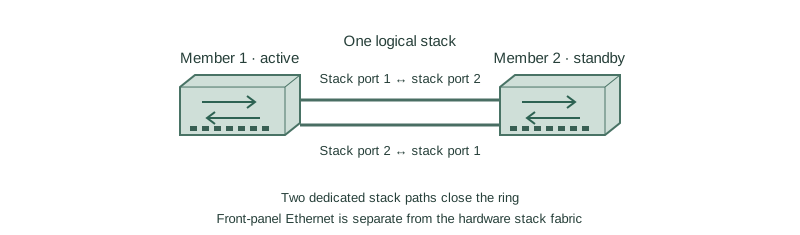
SW1 and SW2 are compatible stack-capable switches connected by both dedicated stack cables. The lower connection closes the ring. Member 1 is preferred active; member 2 is preferred standby where supported.
How it works
Stack ports carry inter-member traffic and control information. A complete ring gives path redundancy; a single cable can leave a working but degraded chain. Ordinary front-panel Ethernet links are not substitutes for dedicated stack ports on this hardware.
Assign stable member numbers before labeling interfaces and provisioning configuration. A port such as Gi2/0/1 belongs to physical member 2. Renumbering changes that mapping after the required reload, so plan it before attaching production hosts.
Priority influences election, but changing priority does not normally preempt the current active switch. Check software compatibility, licenses, provisioning, and the release’s election rules before joining a member; an unsupported image mismatch can prevent a usable stack.
Configure or inspect
switch 1 priority 15
switch 2 priority 14
Verify the result
SW1#show switch
Switch  Role     Priority  State
*1      Active   15        Ready
 2      Standby  14        Ready
SW1#show switch stack-ports summary
Member  Port 1  Port 2
1       OK      OK
2       OK      OK
Ready confirms membership while two OK stack ports per member support the intended ring. Active/standby wording shown here is release-specific; older systems use master/member. Check ring bandwidth and redundancy state, not only member count.
Failure and recovery
One stack cable is removed. Host traffic may continue, but the system has lost the alternate stack path.
Reconnect the correct supported cable to close the ring, verify both stack ports, and review logs for member flaps. Do not force a control-plane switchover merely to apply a priority preference.
Further reading
Key Takeaways
- Use compatible stack hardware and images.
- Close the physical stack ring.
- Member numbers identify physical ports.
- Priority is an election input, not guaranteed preemption.
- A working chain can still be degraded.