Static MAC entries
Pin a known destination to its intended switch port, then distinguish forwarding control from authentication.
Independent lab examples; selected output and frame summaries are illustrative. Port naming and command support vary by switch and software release.
Network and objective
Use an isolated switch supporting static unicast entries. Static discard support and its source/destination semantics vary by platform.
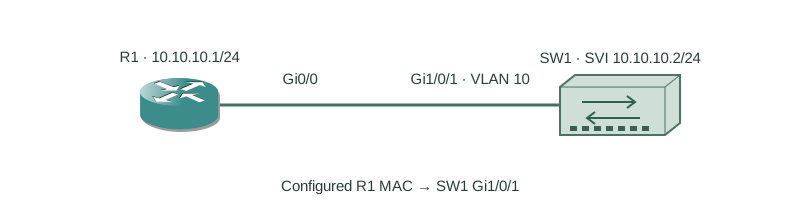
R1 attaches to SW1 Gi1/0/1 in VLAN 10. R1 uses 10.10.10.1/24 and SW1’s management SVI uses 10.10.10.2/24. Record R1’s actual interface MAC; 0200.0000.0001 is the constructed example.
How it works
Generate a ping from R1 to the SVI. Source learning normally creates a dynamic VLAN/MAC-to-port entry. Replacing that with a static forwarding entry gives an explicit location that is not aged like a dynamic entry.
If the device moves, the configured location must be changed. Pinning a forwarding destination is not proof of who owns that address and is not a replacement for 802.1X or port-security. A platform may impose additional source checks, but do not infer a universal authentication mechanism from STATIC output.
Configure or inspect
R1
interface GigabitEthernet0/0
 ip address 10.10.10.1 255.255.255.0
 no shutdown
SW1
vlan 10
interface GigabitEthernet1/0/1
 switchport mode access
 switchport access vlan 10
 no shutdown
interface Vlan10
 ip address 10.10.10.2 255.255.255.0
 no shutdown
mac address-table static 0200.0000.0001 vlan 10 interface GigabitEthernet1/0/1
Verify the result
SW1#show mac address-table static vlan 10
Vlan    Mac Address       Type        Ports
----    -----------       --------    -----
  10    0200.0000.0001    STATIC      Gi1/0/1
STATIC confirms the configured VLAN and destination port. Verify a known exchange as well; a table entry alone does not prove the endpoint is alive.
Failure and recovery
After moving R1 to Gi1/0/2, the static destination still selects Gi1/0/1. Fix the intended access VLAN on the new port, remove the obsolete entry and either configure the new static location or allow dynamic learning. Do not clear dynamic entries expecting to remove a static entry.
no mac address-table static 0200.0000.0001 vlan 10 interface GigabitEthernet1/0/1
mac address-table static 0200.0000.0001 vlan 10 interface GigabitEthernet1/0/2
Further reading
Key Takeaways
- Static entries specify VLAN, MAC and destination interface.
- Dynamic clearing does not remove configured static entries.
- A host move requires a matching configuration change.
- Static forwarding is not identity authentication.
- Confirm both the table and actual traffic.